Live Chat


An online exam is a timed assessment inside your school's learning management system, opened during a window your instructor chooses, and sometimes wrapped in a second layer of software that locks your browser and records your webcam. Two clocks govern the attempt. Almost everything else is a setting someone chose for your course.
Most of the dread around online exams comes from not knowing which parts of that machine are automatic and which parts a person decides. So this walks the session end to end from your side of the screen: what is already set before you log in, what happens when you click Start, what the recording captures, what breaks, and what follows if your session is flagged. Every statement of fact below — how the software behaves, what a school records, what a court held — is quoted from a named US university's own published guidance, from a vendor's own documentation where it is labeled as such, or from the court record.
- Two clocks, and the shorter one wins. Clemson's Canvas documentation states the rule plainly: a quiz "is autosubmitted when time expires unless the Until date expires first."
- Not every online exam is proctored. A plain LMS quiz has no camera at all. Proctoring is a separate layer your instructor switches on.
- A flag is not an accusation. Oregon State: Proctorio "does not pass any judgment on the flags; rather, your instructor will be able to review the information."
- These systems produce false positives. The University at Buffalo says so in its own words: "Students could potentially be flagged for misconduct that did not actually occur."
- The timer does not pause when your connection drops. Texas A&M: "the timer continues running while you are away from the quiz window."
- The room scan is legally contested. One federal district court called a university's practice unreasonable under the Fourth Amendment. That ruling was later vacated, so it binds nobody.
- If you are flagged, you get a process. At Illinois the notice is in writing and your response window is ten business days.
The two clocks that run your exam
Before you touch anything, your instructor has already set an availability window — the span of hours or days when the exam can be opened at all — and usually a separate time limit for a single attempt. Students routinely read those as one number. They are two, they run independently, and the one that expires first ends your attempt.
Clemson University's Canvas documentation states the rule in a single line: "Time limit with Until date: quiz is autosubmitted when time expires unless the Until date expires first." It adds the detail that matters if you never opened the exam at all — "Only quiz attempts that have been started are auto-submitted."
The University System of New Hampshire gives the worked version: "If the 'Available until' date for a quiz is April 1st at 10:59 AM, that is when the quiz must be completed, otherwise, the quiz will auto-complete." Its page also lists the on-screen countdown: "Students will be given warnings 30 minutes prior, 5 minutes prior, 1 minute prior, and 10 seconds prior to autocompletion."
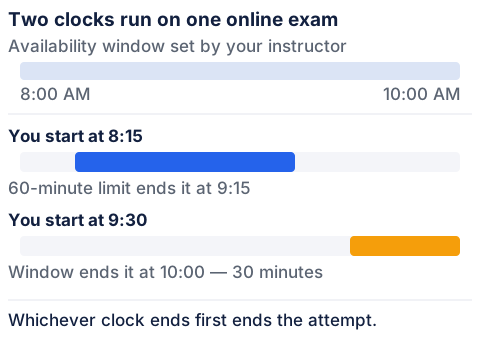
The last hour of an availability window is not a safe place to start a timed exam. Open it early enough that your full time limit fits inside the window, and check both numbers on the exam's front page first — they are shown separately.
A third set of settings shapes what the exam looks like once it opens: whether questions appear one at a time, whether you can go back, whether answer order is shuffled, and whether questions are drawn at random from a larger bank. Those are course-level choices, so the only reliable source for yours is your syllabus or the exam's own front page. If the platform is new to you, our guide to what Canvas LMS is and how it works covers where those instructions sit.
Clicking Start: the lockdown browser and the startup sequence
If your exam is unproctored, clicking Start does what it looks like: the first question loads and the timer begins. The University System of New Hampshire notes the trigger precisely — "The timer will start when the students starts the quiz."
If it is proctored, a startup sequence runs first. The common US arrangement pairs a locked-down browser with a webcam recording. Respondus, the vendor behind LockDown Browser, describes its own product this way in its current student guide: it "prevents you from printing, copying, going to another URL, or accessing other applications during a test." The same guide states the constraint students find most disorienting: "Once a test has been started with Respondus LockDown Browser, you cannot exit until the test has been submitted for grading."
The sequence is short, and worth knowing in advance because every step of it happens on camera.
Proctoring tools run either as a separate application or as a browser extension. Oregon State University's Ecampus tells its students that Proctorio "requires students to use a supported browser and installation of the Proctorio extension; installation of a desktop application may also be required."
Respondus warns what happens if you do not: "If prompted to close a blocked program (e.g. screen capture, instant messaging), choose Yes." Messaging apps and screen-recording tools are the usual culprits, and the ones people forget are running.
Respondus lists these in order: "You will first need to review and agree to the Terms of Use," then "The Webcam Check will confirm that your webcam and microphone are working properly." A dead microphone stops the sequence here, which is why a test run days ahead beats any amount of last-minute studying.
Case Western Reserve University describes the authentication step in one sentence: "You will take a picture of yourself, show your ID, and complete a scan of your room." Oregon State sets out what its tool collects: "your first name, last name, OSU email address, and a photo of the ID, if required."
This one is a course-level option. Oregon State: "Some instructors may enable a 'desk scan' setting which asks you to use your webcam to capture a scan of your testing environment prior to the start of the exam." Respondus notes the tail of the sequence varies, depending "on settings chosen by your instructor."
Live proctoring is a third arrangement: you book an appointment and a person watches in real time. The University of Illinois lists what its live proctor does — "Authenticating the test taker's identity," "Observing the test taker via a webcam," and "Recording the test taker's screen in real time."
What the session actually records
Automated proctoring records more than the camera, and universities publish the list. Oregon State: "During the exam, Proctorio can record the screen, camera video, microphone audio and web traffic of the device to record your testing environment." Case Western Reserve's list for Honorlock names "Webcam video, including audio; Recording of desktop activity; Student information...such as student name, course number, exam name, etc.; Pages visited during the examination session."
Two limits on that are worth knowing. First, in the automated model nobody is watching you live. Case Western Reserve states it flatly: "There is no live person watching the student during the entirety of the exam." Second, access to the recording is restricted and finite. Oregon State says the vendor "cannot access the recordings; only authorized school officials can review the recordings," and, as of October 2026, that "Recordings are stored for 180 days."
A flag is raised by software; misconduct is decided by a person
This is the part vendor pages compress and forum threads get wrong, and it is the most useful thing to understand before you take a proctored exam. The software does not conclude anything. It marks moments for a person to look at later.
Oregon State puts the division of labor in one sentence: Proctorio "flags activity that might not be allowed, but does not pass any judgment on the flags; rather, your instructor will be able to review the information to decide if any action is necessary." Case Western Reserve says the same about its own tool: "Instructors make the final assessment about whether suspected cheating has taken place."
The University of Wisconsin–Madison publishes the clearest description of what a flag is and is not. Flags, it says, "indicate that an unusual activity has occurred (such as loud noises or another person entering the room), and are not automatic confirmations of misconduct," and "All flags are tagged as either low, medium, or high risk and require manual instructor review after the exam." It also names what its tool marks: "being out of view of the camera for an extended period of time, accessing unauthorized websites, and speaking with another person in the room."
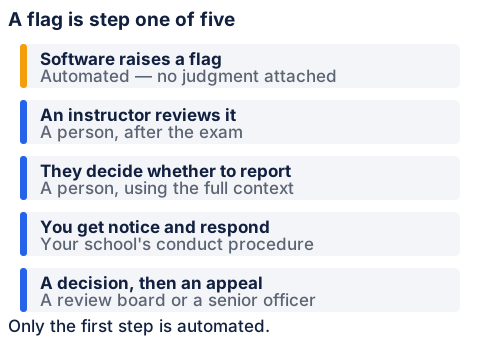
Universities also tell their own faculty that these systems misfire. The University at Buffalo is blunt about it: "These systems are not 100% accurate when monitoring test takers' activities. Students could potentially be flagged for misconduct that did not actually occur." That is not a loophole and it is not reassurance. It is why the four human stages exist, and why a flag is the start of a conversation rather than the end of one.
The room scan is the one genuinely contested step
Everything above is settled practice. The room scan is not, and a student searching this topic deserves the honest version rather than the vendor's or the forum's.
In Ogletree v. Cleveland State University, a federal district court in the Northern District of Ohio held that a public university's pre-exam room scan was a search subject to the Fourth Amendment. Judge J. Philip Calabrese's decision put it in one line: "Cleveland State's practice of conducting room scans is unreasonable under the Fourth Amendment."
That is not where it ends, and coverage that stops there is out of date. Writing in the Penn State Law Review in 2025, Arthur Benne records what happened next: "However, this decision was later vacated for procedural reasons, and the judiciary's future treatment of this important constitutional question is uncertain." The Sixth Circuit vacated the judgment after the plaintiff died, which made the case moot — so, as Benne puts it, it "made no substantive ruling about the district court's analysis," leaving that analysis as "the only federal court analysis on the constitutionality of room scans" and binding on nobody.
The practical reading is narrow. No court ruling currently entitles you to skip a room scan, and refusing one during a live session is a fight you will lose against a proctor who is following a script. If the scan is a genuine problem — a shared bedroom, a roommate who has not consented to being recorded, a documented accommodation — raise it with your instructor or your disability services office in advance and in writing, and ask what alternative the course allows. Some courses offer one; asking is how you find out.
When something breaks mid-exam
Technical failure is the ordinary case, not the rare one, and knowing the behavior beforehand beats any troubleshooting guide read in a panic.
| What happens | What the platform does | What to do |
|---|---|---|
| Your internet drops | Oregon State: "If your Internet connection is lost, Canvas will warn you, but allow you to continue working on your exam." Texas A&M: "the timer continues running while you are away from the quiz window." | Keep working if the page still responds. Reconnect as fast as you can, and note the time it happened. |
| You close the tab or the browser crashes | Answers already entered are generally retained. Texas A&M: "most of your answers will still be there (with the exception of incomplete Text Entry responses)." | Reopen the exam immediately. Expect to have lost the minutes, not the answers. |
| The window closes while you are still working | The attempt is submitted for you. Clemson: the quiz "is autosubmitted when time expires unless the Until date expires first." | Nothing to salvage in the moment. Email your instructor the same day with the timestamps. |
| The proctoring software will not launch | Vendors run their own support channel, separate from your school's. | Case Western Reserve tells students to "Contact Honorlock as a first step rather than asking your instructor." Check your own course page for the equivalent. |
| You lose the session entirely | Nothing automatic recovers it. | The University of Tennessee's instruction is the right default: if something "causes you to stop taking the quiz before you submit it — contact your instructor immediately." |
Write down the time. Every recovery conversation you will have afterward turns on when it happened, and memory is a poor witness an hour later.
If your session is flagged: the procedure that follows
Schools publish these procedures, and they are more structured than most students expect. Two examples, both from the institutions' own pages.
At the University of Illinois, it begins in writing: "The instructor will notify you in writing of the allegation." Your reply is bounded, and it is the whole of your chance to be heard at that stage — "Your written response, delivered to the instructor within ten (10) business days, is your ONLY opportunity to respond to the allegation." Appeals run on a shorter clock and go to a different person: "You must write to the EO (not the instructor or TA) and state your grounds for appeal within five (5) days of receiving the decision."
At UC San Diego, an instructor may file an Intent to Report, which "restricts the student from making changes to the class, such as dropping or changing grading options" — so withdrawing your way out is closed off by design. The student may "accept responsibility, contest the violation, or choose not to respond," and if it proceeds, "Students have the right to appeal the findings of the Academic Integrity Review Board (AIRB), administrative sanctions, and academic sanctions."
Two things follow from reading real procedures rather than rumors. The deadlines are short and yours to miss, so the day a notice arrives is the day to read your own school's policy end to end. And the substance of your response matters more than its tone: a specific, checkable account of what was happening in the room beats a general denial. Our walkthrough of what happens after an online exam flag covers the consequences side in more detail.
Preparing for the exam you actually have
Almost everything above is knowable a week early and unknowable ten minutes before. Which clock is tighter, whether a camera is involved at all, whether the room scan is switched on, which support line to call when the launcher fails — all of it sits in the syllabus, on the exam's front page, or in an email your instructor will answer.
That is the entire mechanical side of preparing, and it takes about twenty minutes. Our proctored exam preparation checklist turns it into a list you can work through, and what a proctored exam is covers the proctoring models in more depth than this piece had room for.
The rest is the part no software touches: knowing the material. If the coursework feeding into the exam has gotten away from you, our online exam help works on the preparation side — study materials built from your syllabus, practice problems worked through with the reasoning shown, and assignments prepared for you to review, learn from and submit yourself. We do not sit exams, we never ask for your login, and your account stays yours. Per-task help starts at $7.89; ongoing weekly support starts at $37.89 a week. What you carry into the session is your own understanding, and that is the only thing a proctoring setup cannot take away from you.