Live Chat


You have worked the problem three times and gotten the same number three times, and the site still says wrong. Before you rework it a fourth time, it helps to know what these platforms actually grade. They grade the value of your answer, and they separately grade its form — how many digits you gave, whether you typed a unit, how you spelled scientific notation, whether you used a capital letter. Either can fail on its own, and the rules for form are set per platform and per question rather than by any shared convention.
That last point is the one nobody publishes, so here it is in a sentence. Cengage's student help for WebAssign says of a question that checks significant figures: "No credit is awarded if you specify too few significant figures." Pearson's authoring documentation for Mastering says the opposite about its own platform: "The number of significant figures a student enters in their answer is NOT graded by the system." Same student, same chemistry, opposite rules — and both sentences are live on the vendors' own sites today.
- "Wrong" usually means outside tolerance, not miscalculated. WebAssign's student help: "by default, numerical questions require the answer to be within 2% of the correct value."
- A Canvas quiz may accept nothing but the exact number. Instructure's guide to the classic Numerical Answer question: "By default, the margin is 0."
- Significant figures are graded on some platforms and not others. Read the two quotes above before you start adding and removing digits.
- Rounding early is the usual culprit in a multi-part problem. Pearson tells students to "round at the end only."
- Scientific notation has at least three spellings. WebAssign wants
1.23e-5, WeBWorK writes2.1E2, Canvas New Quizzes takes1.234*10^5in some fields and refuses it in others. - Read the feedback line before you change anything. Platforms usually say which of the two failures happened, and students routinely fix the wrong one.
The grader compares you to a window, not a number
Auto-graders do not test whether your answer equals the key. They test whether it falls inside a band around the key, and that band is a setting. WebAssign's student help states the default plainly: "By default, numerical questions require the answer to be within 2% of the correct value. Particular questions, classes, or instructors might require greater accuracy." The instructor-facing page repeats the figure and warns whoever set up your course not to use zero, which "often results in some correct answers being marked incorrect."
Pearson describes the same idea for Mastering in a student page updated on 18 September 2025: "The typical grading tolerance for most numeric answers in Mastering assignment questions is within 2% or 3%… if the grading tolerance is 2% and the correct answer is 100, then answers within the range of 98 and 102 are also graded as correct."
Canvas is the outlier, and it catches people. For a classic Canvas quiz, Instructure's guide describes the numerical question type this way: "if the answer were 2.12 with a 0.01 margin of error, the quiz accepts any response between 2.11 and 2.13 (inclusively). By default, the margin is 0." If your instructor built the question and left that field alone, the exact number is the only thing that scores.
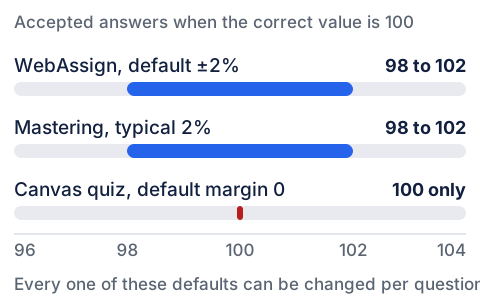
A percentage band also scales with the answer. Two percent of 9.81 gives a generous window of 9.6138 to 10.0062. Two percent of 0.03 gives 0.0294 to 0.0306, and it is the same setting doing both.
Significant figures: graded on one platform, ignored on another
On WebAssign, when a question checks significant figures, the count is part of the grade: "you might receive partial credit if you specify the correct value with more than the required number of significant figures. No credit is awarded if you specify too few significant figures." And Cengage does not defer to your course on how to count them. Its sig-fig rules page opens: "Regardless of what your instructor or textbook teaches, you must follow the rules listed here to receive credit for answers that are required to be specified to a certain number of significant figures."
Two of the counting rules cost points constantly. Trailing zeros with no decimal point do not count, so 500 reads as one significant figure and 13000 as two. Trailing zeros with a decimal point do count, so 500. is three and 2.000 is four. Hence the rule students find strangest: to express 1000 to two or three significant figures, Cengage says "you must use scientific notation, for example, 1.0e3 or 1.00e3."
Mastering works differently. Pearson's authoring documentation states that "the number of significant figures a student enters in their answer is NOT graded by the system. The significant figures setting determines the properly-formatted answer to which the % tolerance is applied." Your digit count is not scored, but it fixes which number the tolerance is measured around — which is why Pearson still tells students to "use at least 3 digits or significant figures in your answers."
Pearson's own worked table shows how far the digit count moves the target. Multiplying 26.0 by 8.00, the official answer is 208 and the accepted range is 204 to 212. Multiplying 26 by 8.0 — the same figures with one fewer significant digit each — the official answer becomes 210 and the range becomes 206 to 214. An entry of 205 sits inside the first range and outside the second.
The other two publishers set this per question. McGraw Hill's ALEKS library documents controlling significant digits and tolerance when authoring "a question where students will provide a numeric answer that is graded to a specific number of significant digits and has a tolerance range." Canvas New Quizzes offers a Precise Response requirement whose precision type is either "significant digits" or "decimal places." In both, whoever wrote the question decided.
Rounding at the wrong step, and how it cascades
The most expensive mistake in a multi-part problem is rounding in the middle and reusing the rounded number. Pearson is direct: "Rounding too early can cause your final answer to be outside of the allowed tolerance range, even if you have otherwise calculated correctly."
Watch it happen. Part (a) of a kinematics problem works out to 27.46 m/s. You round to 27.5 and submit. On a ±2% tolerance the accepted window around 27.46 runs from 26.9108 to 28.0092, so 27.5 is comfortably inside and scores.
Part (b) asks how much faster that is than the 27.00 m/s recorded at the previous gate. The key is 27.46 − 27.00 = 0.46 m/s. You reuse the number you just submitted: 27.5 − 27.00 = 0.50 m/s. A ±2% window around 0.46 runs from 0.4508 to 0.4692, so 0.50 sits about 8.7% high and is marked wrong — for a subtraction you performed perfectly.
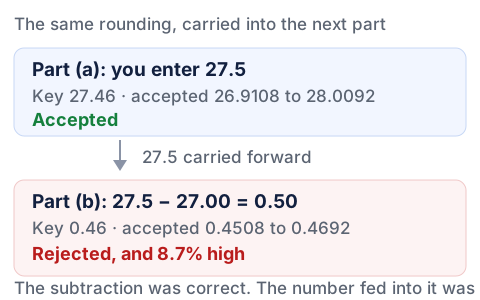
The University of Washington physics laboratories document the same pattern and add the diagnostic half: "The student assumes that the problem is with the answer that is marked wrong, when, in fact, he or she had done that part of the question correctly." If part (b) fails, suspect part (a).
How the platform rounds decides borderline cases. Cengage documents WebAssign's rule as "always rounded away from zero if the rounding digit is 5," noting it "is sometimes called rounding up but away from zero better describes the rule for negative values." In their worked row, 7.652 becomes 7.7 to the tenths and 7.65 to the hundredths, while −7.652 becomes −7.7 and −7.65.
Units: the box either wants them or refuses them
Typing 3 m into a box that wants 3 is not a harmless extra. Cengage lists it among the errors that stop an answer being graded at all, under "Specifying a unit when none is required." Some courses say so up front: the University of Kentucky's General Chemistry program publishes grading guidelines reading, in capitals, "Do NOT include units in your answer," under the broader rule that "answers containing additional text or characters beyond the correct answer will be marked incorrect."
When the box does want units, WebAssign publishes the syntax. The equivalents are generous — "the responses 2500 meters, 2.5 km, and 2.5e+6 mm are all equivalent" — and the formatting rules are not.
| Rule, as Cengage states it | Rejected | Accepted |
|---|---|---|
| "Type a space between the number and the unit." | 20g | 20 g |
| "Units are case-sensitive." | 60 S | 60 s |
| "Do not combine multiple values and units." | 3 minutes 15 seconds | 3.25 minutes |
| Caret for powers, not the words square or cubic | 3 square miles | 3 mi^2 |
| "To divide a unit, use /. Do not use per." | miles per hour | miles/hour |
| "Do not enter a fraction for the number when units are required." | 3/4 inch | 0.75 inch |
The last row is a split inside one platform: WebAssign's plain numerical box lists "A fraction or ratio" such as 3/7 among the notations it accepts, until a unit is required.
One number, four spellings
There is no shared syntax for scientific notation across courseware, and every publisher documents its own.
| Where you are typing | What the documentation says to enter |
|---|---|
| WebAssign, numerical question | "Always use a lowercase e and an integer exponent, for example, 1.23e-5." Decimal exponents such as 1e2.5 "are not allowed." |
| WeBWorK, student help page | "2.1E2 is the same as 210" and "2.1E-2 is the same as .021". |
| Canvas New Quizzes: Exact Response, Within a Range | Scientific notation allowed, "accepted format: 1.234*10^5." |
| Canvas New Quizzes: Margin of Error, Precise Response | These fields "do not accept entries written in scientific notation." |
| University of Kentucky General Chemistry | "For answers in scientific notation, use the format 2.2e2 or 2.2e-2." |
The Kentucky page names a trap beyond syntax: where a question requires standard form, "numbers in scientific notation will be marked incorrect," and vice versa. Absent a stated preference, "345 and 3.45e2 are equivalent."
Implicit multiplication, and what 1/2x means
Typing 1/2x when you mean one over two-x is the most reliable way to lose a symbolic answer, and the WeBWorK student help page says so directly: 1/2x "is evaluated from left to right," and the fraction it produces is one half times x, "which might not have been what you meant." The governing rule is one line down: "Multiplications and divisions are performed left to right: 2/3*4 = (2/3)*4 = 8/3." Function arguments behave the same way — "sin 2t is interpreted as sin(2)t, i.e. (sin(2))*t, so be careful." Cengage warns from the other side that "sin x + 2 is ambiguous" and tells you to enclose the argument in parentheses.
Whether implicit multiplication is allowed then splits, and it splits inside one product. In a WebAssign symbolic question, "you can enter an asterisk (*) for multiplication or use implicit multiplication with variables." In a numerical question, Cengage lists it among the errors that make an answer ungradeable: 3(14) is rejected, 3*14 required. That page also requires 2**3 rather than 2^3, while WeBWorK accepts both: "You can use either ^ or ** for exponentiation."
Grouping symbols split the same way. WeBWorK tells students they "can also use square brackets, [ ], and braces, { }, for grouping." Cengage lists "brackets or braces instead of parentheses" as a syntax error, rejecting 4*{x+3} for 4*(x+3). A habit built in one course costs points in the next.
Commas, capitals and the paste that breaks everything
Commas flip meaning inside one platform. WebAssign's numerical box follows US convention, where commas "optionally" separate groups of three digits, and lists 1,000,000.89 as valid. The same page adds that "commas are not allowed when significant figures are checked," and the symbolic-question page is blunter: "Do not type commas in numbers; 5,280 is not correct." Three boxes on one site, three answers.
Case is not cosmetic. Cengage's troubleshooting checklist puts it first: "If the problem gives a variable as x, your answer must use x, not X." Greek letters must be typed by name in the right case — rho for ρ — and "don't replace it with an English letter that looks similar." The same list warns that WebAssign "treats notation like f(x) or y(x) as multiplication," so f(x) = x + 1 where the question asked for y = x + 1 is read as f times x.
Do not paste. Cengage states it outright: "Copying text from anywhere and pasting it in an answer box will result in an error. You must type your response using the keyboard or the tools provided." Characters that look identical on screen are often not the ones the parser expects — a minus sign copied out of a PDF is the classic example.
One consolation from the same page: an unreadable answer is not treated as a wrong guess. "If your assignment allows you to submit answers by question part, answers with syntax errors are not counted as incorrect submissions."
Work through it in this order
The order you check things in decides how many submissions you burn. Read the screen before you change the number.
Platforms distinguish the two failures for you. Mastering's documented messages include "Very close. Check the rounding and number of the significant figures in your final answer," which Pearson pairs with "no points deducted," and a separate, penalized "Not quite. Check through your calculations…" The University of Washington says the same for WebAssign: with no sig-fig hint, "the reason for your answer being marked wrong has nothing to do with sig figs… Do not mess with the sig figs of your answer unless you see the hint."
Cengage describes a tip below the box that "indicates that a number is expected and might also specify whether significant figures or units will be checked," plus an icon beside the box on questions that check significant figures. Where your instructor enabled them, they answer what you are guessing at.
Rebuild the chain from the original data with everything still in the calculator, and round only at the last step. If an earlier part feeds this one, redo that part too rather than trusting the value you typed.
WeBWorK tells students to use the preview button "to see exactly how your entry looks. E.g. to tell the difference between 1+2/3*4 and (1+2)/(3*4)." Cengage says the same for symbolic questions: "Submit your response only when the formatted notation is correct." A preview is not a submission.
Coding errors in question banks are real and courses fix them. Cengage's advice: "describe the problem, reference both the assignment and question for which it happened, and include the answer you believe to be correct." Your instructor can then rescore the item, which retyping never will.
None of this makes an auto-graded problem set enjoyable. It does make it predictable: once you know form and value are scored separately, a rejected answer becomes a two-item checklist. The same instinct applies to any scored work — reading the scoring sheet first tells you what is being measured — and if your course lives in a learning management system rather than a publisher's site, our guide to what Canvas is covers where quizzes sit.
Sometimes the real problem is not the notation. It is that four problem sets came due in one week and you are debugging syntax at midnight — a scheduling problem in a math costume, and a system for tracking what is due fixes more of these than any formatting rule. If the week has gotten away from you, our homework help service prepares the work, priced per page, and hands it back for you to check and enter yourself from your own account. We never ask for your login and we do not submit on your behalf. What goes in the box stays yours to stand behind.