Live Chat

There is no PDF citation format, because a PDF is not a kind of source. It is a delivery format, the same way a paper photocopy is. Work out what the document actually is — a journal article, an agency report, a book chapter, a set of lecture slides — and then cite that, using the ordinary rule for that source type. A PDF of a journal article is a journal article. A PDF of a government report is a report.
That is the answer in APA 7 and in MLA 9, and it is not a shortcut we invented: neither manual lists "PDF" among the source types it gives examples for. Below are the entries for the six cases students actually meet, and honest answers for the three that stall people — no author, no date, and a file that is not published anywhere at all.
- Cite the work, not the wrapper. APA 7 and MLA 9 both organize their examples by what a source is. The file format is not one of the categories.
- APA's index of reference examples lists 52 types. None is "PDF." MLA's Citations by Format page lists five basic source types. None is "PDF" either.
- The hard part is identification, not formatting. Once you know it is a report, the report rule does the rest.
- APA 7 and MLA 9 disagree about the platform. APA tells you to leave JSTOR and Google Scholar out of the entry; MLA makes the platform a second container.
- Get the DOI. Both styles prefer it, and it survives the file moving to a different address.
- Check the edition on anything you copy from. Of eleven ranking pages we opened, three name no style edition at all, and every one that names a Chicago edition names the superseded seventeenth.
Neither manual has a slot for the file format
Start with APA. Its Reference examples page, last updated June 2026, tells you how to find the right pattern: "first select a category (e.g., periodicals) and then choose the appropriate type of work (e.g., journal article) and follow the relevant example." Categories and types of work — not file types. A few lines later APA adds: "print and electronic references are largely the same."
We counted what is on that page: 52 reference example types, from journal articles and government reports through to TED talks, musical scores and Bluesky posts. Not one is a PDF. APA does use square brackets to describe a work — [PowerPoint slides], [White paper] — but the description names the kind of thing it is, not the file it arrived in.
MLA arranges its guidance the same way. Its Citations by Format page — the page whose whole job is to sort entries by format — tells you to "evaluate the work you're citing to see which elements apply to the source," then gives five basic source types: books, online works, songs and recordings and performances, movies and videos and television, images. "Format," in MLA's own usage, means the kind of work. A PDF is not on the list.
One document makes the point better than either manual. The National Cancer Institute booklet APA uses in its own government-report example is offered on NCI's site in three formats at once: PDF, Kindle and ePub. Same booklet, same author, same date, three files. If the format changed the citation, that booklet would need three of them.
What ranks for this question, and the edition problem underneath it
In August 2026 we opened eleven pages returned for this question and its APA and MLA variants. Citation-tool marketing supplied six of them: two from Scribbr, two from Grammarly, one each from Citation Machine and EasyBib. PDF-software blogs supplied the other five: Smallpdf, WPS Office, Documind, Foxit, and — genuinely — AnyRecover, a file-recovery vendor. Chegg Writing and QuillBot rank on the same query and are not in the count. The one style authority that surfaced at all was an MLA Style Center answer about PDFs, carrying MLA's own banner saying it belongs to the eighth edition.
Several get the core principle right; Scribbr says plainly that APA "doesn't provide a specific citation format for PDFs." The problem is one layer down, and we searched each page for it: which edition are they teaching?
| What we looked for | Result across 11 pages, rechecked October 2026 |
|---|---|
| Names no edition of any style, anywhere on the page | 3 — AnyRecover, Foxit, WPS Office |
| Names a Chicago edition | 4 — Citation Machine, Documind, EasyBib, Smallpdf |
| Of those, names CMOS 17, superseded in 2024 | 4 of 4 |
| Names CMOS 18, the current edition | 0 |
The wording is not ambiguous. Documind heads a section "Citing a PDF in Chicago 17th Edition." Smallpdf heads one "How To Cite a PDF in Chicago Style (17th Edition)." The two Chegg-owned generators' PDF guides name their editions in the footer, and as of October 2026 both still name the old ones: EasyBib's reads "We cite according to the 8th edition of MLA, 7th edition of APA, and 17th edition of Chicago (9th edition Turabian)," and Citation Machine's carries the identical list abbreviated, "8th ed. of MLA, 7th ed. of APA, and 17th ed. of Chicago." The same companies' citation-generator pages say otherwise: the footer there reads "9th edition of MLA, 7th edition of APA, and 18th edition of Chicago" on EasyBib and "9th ed. of MLA, 7th ed. of APA, and 18th ed. of Chicago" on Citation Machine. One company, two editions, depending on which of its pages you open. MLA's ninth edition arrived in 2021; Chicago's eighteenth in 2024.
Going to the source does not automatically rescue you either. Every MLA Style Center post filed under its own PDF tags carries the eighth-edition banner — four under PDFs and one under pdf, five for five. MLA has not written a ninth-edition answer to the PDF question, because from MLA's point of view there is nothing new to answer.
Three tells that a PDF citation template you have found is stale. It prints "PDF file" as a required part of the pattern rather than an optional note. It gives Chicago guidance without naming the eighteenth edition. Or its APA example ends with the name of the database you searched, which APA 7 tells you to leave out. Check the edition at the top of any page before you copy a pattern from it — including this one.
Step one: work out what you are actually holding
This is the step every ranking page skips, and the only genuinely difficult part. A file called chapter3final.pdf tells you nothing. The document inside it always does.
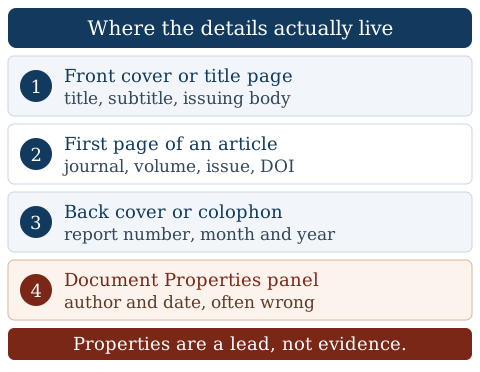
Work those four places in order, then run one check outside the file.
A report prints its title and the issuing body on the cover. A book has a copyright page behind it. A thesis has a title page naming the degree and the school.
A journal article prints the journal name, volume, issue, page range and usually a DOI in the header or footer of its opening page.
Reports keep their identifiers at the back. This is where a report number and the month of publication live, and it is the single most-missed page in the file.
File then Properties in Acrobat, or the info panel in your browser's viewer. It sometimes recovers an author or a creation date. Treat whatever it says as a lead, not as a fact.
If the document is published anywhere, this finds its home page, and the home page settles the publisher, the date and often a DOI. If it finds nothing, you may be holding something unpublished — see below.
Here is why the fourth step carries a warning. We downloaded the NCI booklet and read its embedded metadata. The author field is correct and useful: National Cancer Institute. The creation date, 30 January 2019, matches the publication month. But the title field reads Unknown — while the back cover of the same file prints "NIH Publication No. 18-2059" and "January 2019," and NCI's own page for the booklet says the information in it "was last updated in January 2019." Three sources agreeing, and the metadata field abstaining.
The six common cases, in APA 7 and MLA 9
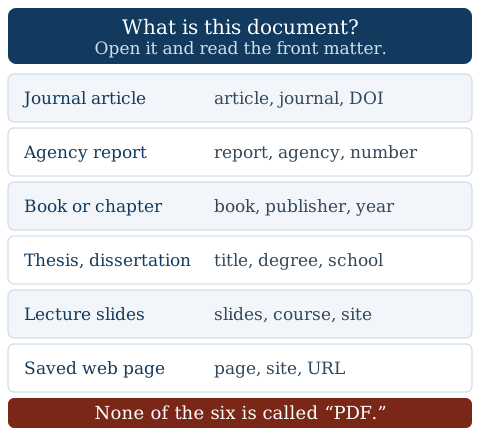
Once you have identified the document, the entry is the ordinary entry for that source type. The PDF changes nothing.
| What the PDF is | APA 7 category | MLA 9 shape |
|---|---|---|
| A journal article | Journal article | Article, then the journal as its container, DOI at the end |
| A report from an agency or a charity | Report by a government agency, or report with individual authors | The agency is the author; report number goes in a supplemental element |
| A book, or one chapter of one | Book/ebook, or chapter in an edited book | Book, or the chapter inside the book as container |
| A thesis or dissertation | Published or unpublished dissertation or thesis | Title, then the school, then the repository as container |
| Lecture slides or a course handout | PowerPoint slide or lecture note | Slides, with the course site as container |
| A web page saved or printed to PDF | Webpage on a website | The page, with the site as container |
Worked example: an agency report. The NCI booklet, in APA's own wording from its government-report example page:
National Cancer Institute. (2019). Taking time: Support for people with cancer (NIH Publication No. 18-2059). U.S. Department of Health and Human Services, National Institutes of Health. https://www.cancer.gov/publications/patient-education/takingtime.pdf
Look at what that entry does not contain. The URL ends in .pdf, and the word "PDF" appears nowhere in the reference. Applying MLA 9's template of core elements to the same document gives the following — ours, not MLA's, with the report number in the supplemental element at the end because it applies to the entry as a whole:
National Cancer Institute. Taking Time: Support for People with Cancer. U.S. Department of Health and Human Services, National Institutes of Health, Jan. 2019, www.cancer.gov/publications/patient-education/takingtime.pdf. NIH Publication No. 18-2059.
Worked example: a journal article. Take a real one, downloaded as a PDF from wherever you found it — a library database, a reading list, an author's own faculty page. In APA 7:
McCabe, D. P., & Castel, A. D. (2008). Seeing is believing: The effect of brain images on judgments of scientific reasoning. Cognition, 107(1), 343–352. https://doi.org/10.1016/j.cognition.2007.07.017
And in MLA 9, with the same DOI carrying the location:
McCabe, David P., and Alan D. Castel. "Seeing Is Believing: The Effect of Brain Images on Judgments of Scientific Reasoning." Cognition, vol. 107, no. 1, Apr. 2008, pp. 343-52, https://doi.org/10.1016/j.cognition.2007.07.017.
Neither entry mentions the file, and neither mentions where you got it — and that second point is where the two styles part company. If the broader differences are still fuzzy, our comparison of APA 7 and MLA 9 covers how these elements behave across ordinary sources.
Where APA 7 and MLA 9 genuinely disagree
You downloaded the article from JSTOR. Does JSTOR go in the entry? The two manuals answer differently, and both answers are current guidance.
| Question | APA 7 | MLA 9 |
|---|---|---|
| Name the database you searched? | No. Section 9.30 names JSTOR, Google Scholar, ProQuest, EBSCOhost and ScienceDirect among the databases to leave out | Yes. The platform becomes the second container |
| Name the file format? | No. The bracketed description names the type of work, not the file | Optional, as a supplemental element |
| DOI or URL? | "Include a DOI for all works that have a DOI" | "the DOI, permalink, or URL," in that order of preference |
| A work with both a DOI and a URL? | "include only the DOI" | The DOI wins |
APA's reasoning explains the whole class: "When you buy a book at a bookstore or order a copy off the internet, you do not write the name of the (online) bookstore in the reference." The route you took is your business, not your reader's. MLA takes the opposite view on purpose — its own current example of a print article read online ends JSTOR, www.jstor.org/stable/41403188, because MLA wants the reader to retrace your path exactly.
The practical consequence matters more than the philosophy. Find the DOI and use it. A PDF sitting on a course site or a faculty page has an address that can stop working without warning; the DOI does not move. If the article has one, both styles want it — and you have then cited the article rather than the copy.
The DOI is usually printed on the first page of an article PDF, in small type in the header or footer. If it is not there, search the exact title in your library database or on the journal's own site; the record displays it. Then click the finished DOI link once before you submit, to confirm it opens the article you meant.
No author, no date, nowhere to point
No author. Before you move the title into the author slot, look again. An apparently author-less PDF may still have a group author — an agency, a nonprofit, a university department, a committee — printed on the cover or in the running footer. If it does, that group is the author, and using it gives you a far more useful in-text citation. Only when no person or body stands behind the document does APA 7 move the title into the author position: Title. (Date). Source., cited in text as (Title, year).
No date. Write n.d. for "no date" in both the reference and the in-text citation: Author. (n.d.). Title. Source. gives you (Author, n.d.). MLA includes each element only when it is relevant, so an undated source simply has no publication date. MLA's guidance on undated documents — written for the eighth edition, and named as such here because MLA has not restated it for the ninth — adds one option: if the content lets you infer a date, put that date in square brackets.
Nowhere to point. When the missing element is the source — the document is not published, not archived, not retrievable by your reader — APA's instruction is to "cite as a personal communication or find another work to cite," with no reference list entry at all. In text it becomes (C. C. Communicator, personal communication, month day, year). A scanned handout your instructor emailed to the class, with no publisher and no home on the web, is that case. If the material itself matters to your argument, reproduce it in an appendix; our guide to what belongs in an appendix covers how.
None of these three is a defect in your paper. They are ordinary situations with ordinary answers, and handling them correctly reads better than inventing details the document never had.
Chicago 18 is the exception that proves the rule
One style does let a file format into the entry, and it is worth knowing where the boundary sits. Chicago's free citation quick guide, for the eighteenth edition, says of books read electronically: "To cite a book consulted online, include either a URL or the name of the database. For downloadable ebook formats, name the format." The example Chicago gives names Kindle.
So a downloaded ebook can carry its format in Chicago. A journal article does not: for articles consulted online, the same page asks you to "include a URL (preferably one based on a DOI)" and adds that you may "alternatively, list the name of the database." Same manual, same page, different answer by source type — which is the argument of this whole post in miniature. What decides the entry is what the document is.
One naming point, because Chicago is the style that trips it. Chicago runs two systems, and they end differently. Notes-bibliography finishes with a page headed Bibliography. Author–date finishes with a reference list — Chicago's own author–date examples are labeled "reference list entries," and Purdue OWL's CMOS 18 guide tells you to head that page "References." So "Chicago uses a bibliography" is right for one system and wrong for the other, which matters in any social-science course running author–date.
What goes on the page differs too. A Chicago bibliography must contain everything you cited, and it may also carry other sources you consulted — the second half is a permission, not the definition. APA's References and MLA's Works Cited hold what you cited and nothing else.
Before you paste it in
Four checks, in order, and they take under a minute each.
- Name the source type out loud. "This is a government report." If you cannot finish that sentence, you are not ready to write the entry.
- Confirm the edition. APA 7, MLA 9, Chicago 18. If a page you copied from does not say which one it means, do not use it.
- Check for a DOI before you settle for the URL you downloaded from.
- Match the in-text citation to the first element of the entry. If the entry begins with a group author, the in-text citation does too. This is the single most common mismatch on a reference page.
Then compare the finished entry against a correct one in the same style. Our walkthrough of term paper format in APA and MLA shows what a whole reference page looks like in each — a faster check than reading the rule again. And if the real problem is thirty downloaded articles and a deadline that arrived early, that is a time problem rather than a formatting one; our APA paper writing service exists for it.
One habit outlasts every template here. Before you trust a citation pattern from anywhere, scroll to the top of the page and find the edition it belongs to. That one check separates current guidance from advice written for a manual replaced two editions ago — and on the evidence above, that is not a rare problem.